
Choosing the right laptop for business and remote work plays a major role in daily productivity and work comfort. A reliable device helps professionals complete tasks efficiently, attend video meetings smoothly, and manage workloads without constant technical issues. The right laptop also reduces downtime and supports consistent performance throughout long working hours.
In this guide, we will explain the most important features to consider before purchasing a business laptop. You will also learn about different laptop types designed for various work styles and professional needs.
Understanding Business and Remote Work Needs
Choosing the right laptop for business and remote work begins with understanding real daily work requirements. A suitable device should support productivity, flexibility, and security across different work environments.
Reliable Performance for Everyday Business Operations
Business professionals depend on laptops that can handle routine tasks without performance interruptions. Applications such as email, document editing, and project management tools require consistent processing speed. A reliable system ensures smooth multitasking during meetings and deadline driven workdays.
Mobility That Supports Remote and Hybrid Work
Remote work often requires moving between home offices, coworking spaces, and travel locations. A lightweight and portable laptop allows professionals to stay productive wherever they work. Strong wireless connectivity helps maintain stable communication during virtual meetings and collaboration.
Strong Security for Protecting Business Information
Business laptops must safeguard sensitive company data from unauthorized access and online threats. Security features help protect files when employees work outside secure office networks. Reliable data protection is essential for maintaining trust and business continuity.
Battery Life and Portability for All Day Productivity
Long battery life enables uninterrupted work during travel and extended meetings. Lightweight laptops reduce fatigue and make daily mobility easier for professionals. Together, portability and battery efficiency improve comfort and productivity throughout the workday.
Key Features to Consider Before Buying
Before purchasing a laptop for business or remote work, it is important to evaluate the features that affect performance and usability.
The right combination of hardware and design ensures smooth multitasking, long term reliability, and comfortable daily use.
Understanding these key features helps you make a confident and informed buying decision.
Processor
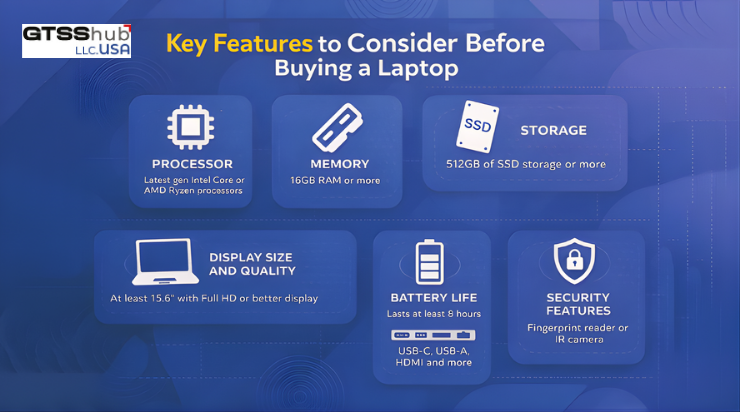
The processor determines how quickly your laptop can run multiple applications simultaneously. Intel and AMD processors provide reliable performance for business tasks, while Apple Silicon offers excellent efficiency. For basic business tasks, mid-range processors are sufficient, while high-end CPUs are better for demanding workloads.
Memory
RAM helps your laptop handle several applications without slowing down, especially during multitasking. A minimum of 8 gigabytes is recommended for basic tasks, while 16 gigabytes ensures smooth performance. More RAM is necessary if you work with large datasets or run virtual machines regularly.
Storage
Solid State Drives are faster and more reliable than traditional hard drives for storing important files. 256 gigabytes is a reasonable minimum for basic business use, while 512 gigabytes or more suits heavier workloads. Larger storage ensures that you have enough space for documents, software, and multimedia files.
Display Size and Quality
The display affects comfort and productivity during long hours of work and video calls. Full HD resolution is the standard, while higher resolutions improve clarity and visual experience. Brightness and color accuracy matter if you work with graphics or detailed documents frequently.
Battery Life
A laptop with long battery life prevents interruptions during important meetings or remote work sessions. All-day battery performance is ideal for professionals who frequently move between locations. Modern laptops often provide between six and twelve hours of usage depending on workload.
Ports and Connectivity
Essential ports allow you to connect monitors, external drives, and other business peripherals easily. USB-C, Thunderbolt, and HDMI ports provide flexibility for different setups and work environments. Reliable Wi-Fi and optional Ethernet support ensure uninterrupted connectivity during video conferences.
Security Features
Security features help protect business data and ensure safe remote access. Fingerprint readers, Trusted Platform Modules, and BIOS protections prevent unauthorized access. Investing in secure laptops reduces the risk of cyber threats and data breaches significantly.
Types of Laptops for Different Work Styles
Different professionals have different work habits, which makes choosing the right laptop type essential. Understanding these categories helps match your device with your daily tasks and working environment.
Ultraportable Laptops
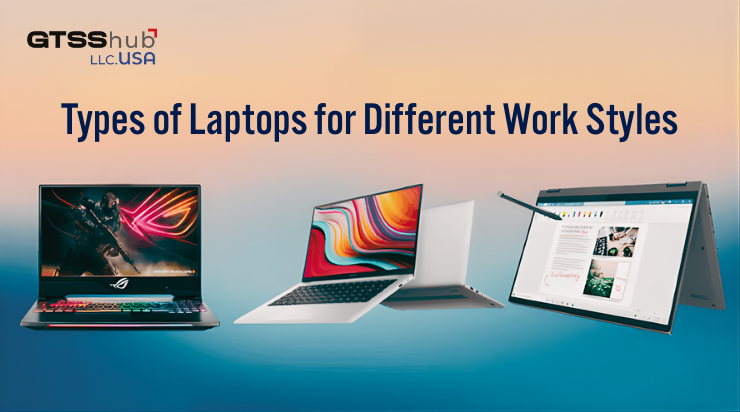
Ultraportable laptops are designed for users who travel frequently or work from multiple locations. They are lightweight, easy to carry, and usually offer long battery life for all day productivity. These laptops are ideal for meetings, presentations, and remote work that requires constant mobility.
Workstation Class Laptops
Workstation class laptops are built to handle demanding workloads without performance limitations. They support powerful processors, large memory capacities, and advanced graphics for complex applications. These laptops are suitable for video editing, data analysis, engineering software, and heavy multitasking.
2 in 1 and Convertible Laptops
2 in 1 and convertible laptops offer the ability to switch between laptop and tablet modes easily. They are useful for note taking, presentations, and creative tasks that benefit from touch interaction. This category suits professionals who need versatility and adaptability in their daily work routine.
Best Laptops for Business and Remote Work
Selecting the right laptop becomes easier when you evaluate models designed specifically for business and remote work.These laptops offer a balance of performance, portability, and security to support modern professional needs.
Below are some of the best options available that deliver reliable performance across different work styles.
Dell Precision 7770
The Dell Precision 7770 is ideal for professionals handling power-intensive tasks. It features a high-performance CPU, large RAM, and fast SSD storage for smooth multitasking. This laptop is best suited for data analysis, engineering software, and remote work requiring workstation performance.
HP EliteBook 840 G7
The HP EliteBook 840 G7 is a lightweight business laptop with strong security features. It offers an Intel i7 processor, excellent battery life, and a premium display for long workdays. This laptop is perfect for frequent travelers and professionals who require reliable remote connectivity.
Microsoft Surface Pro 1866
The Microsoft Surface Pro 1866 is an ultra-portable 2-in-1 device with touch and pen support. Its slim design and moderate performance make it suitable for hybrid work and meeting presentations. This device is ideal for professionals who value mobility and flexibility during remote collaboration.
Microsoft Surface Pro 7
The Microsoft Surface Pro 7 provides versatility for remote workers and hybrid setups. It has a touchscreen, solid battery, and reliable performance for light to moderate productivity tasks. This laptop works well for users who need portability without compromising essential business functions.
Conclusion
Selecting the right laptop for business and remote work enhances productivity, mobility, and security. Focus on features that align with your workflow instead of choosing based on brand reputation alone. Models like Dell Precision 7770, HP EliteBook 840 G7, Microsoft Surface Pro 1866, and Surface Pro 7 offer reliable performance. Investing time in selecting the right laptop ensures a smoother and more efficient remote work experience.


Leave a Reply